Solutions

What each voyage earns, from the estimate to the last claim.

NethuneX carries a voyage from the pre-fixture estimate through the laytime clock and the demurrage claim to its result, and sets what it earned against what it was fixed to earn, line by line.

The problem

The estimate is in one spreadsheet. The actuals are in five others.

The voyage was fixed on a worksheet. Port costs arrive from the agent, bunker invoices from the supplier, the laytime from a statement of facts, and the demurrage claim is worked out by hand weeks later, close to its time bar. By then nobody can say why the voyage earned less than it was fixed at.

What the office asks
  • What will this cargo earn per day, ballast leg included?
  • Why did the voyage come in under the estimate?
  • Which claims are ready to file, and which bars first?
  • Which demurrage and hire is still owed to us?
How NethuneX handles it

One voyage record, from the worksheet to the receivable.

Voyage Estimator

Fix on a worksheet you can defend

Each column is one estimate: ballast and laden legs, port days, bunkers by grade, freight on Worldscale, per tonne, lump sum or daily, commissions and the EU ETS cost. It returns TCE and breakeven per day, shows how far freight, bunker price and speed move the result, and works the freight rate back from a target TCE. Fixing it freezes the estimate as the voyage’s baseline.
Voyage Manager › Costs

Estimate against actual, line by line

For a voyage fixed from the estimator, port costs, bunkers, demurrage, canal dues and cost entries are drawn from their own records and set against the estimate line by line, with the same TCE formula on both sides and a plain-language account of what moved the result.

Laytime & Demurrage

The claim filed before the time bar

Paste a statement of facts or upload it as a PDF, and the laytime calculation is drafted from it: rain, waiting for a berth, breakdowns and shifting taken off, for you to check and save. Demurrage or despatch follows at the charter party rate, and each claim is scored on whether its pack is complete and ranked by the time bar it faces.

Charter Parties · Hire Statements · Payables & Receivables

Hire, performance and what is owed

A performance check sets the warranted speed and consumption against good-weather noon reports. Hire statements net off-hire and commissions from gross hire. Demurrage claims and hire statements become receivables, and a reminder goes to the debtor by email, one deliberate click at a time.

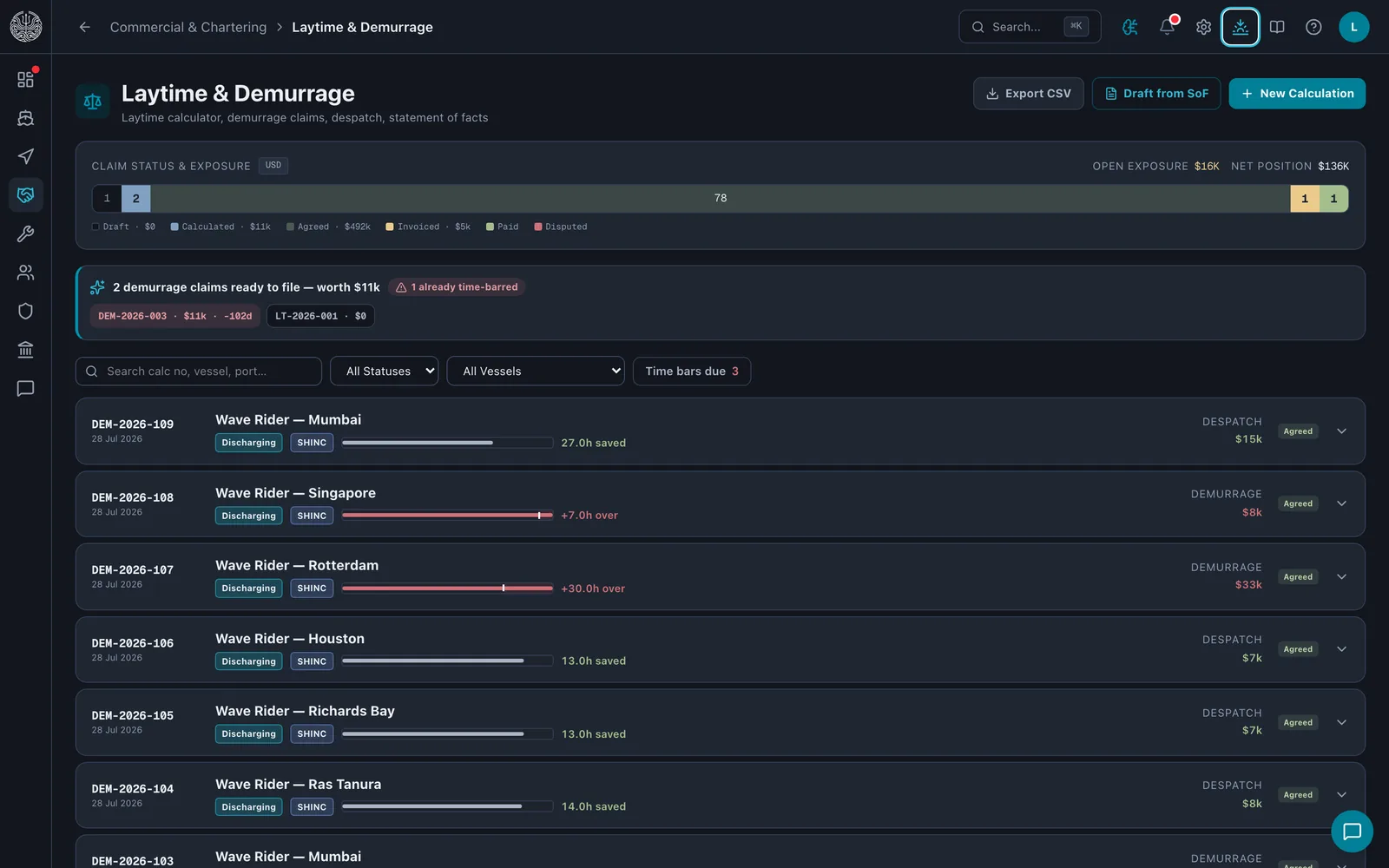
The Laytime and Demurrage module: a claim status bar, a note that two claims are ready to file and three time bars are due, and a row per port call showing laytime used against allowed with the despatch or demurrage amount.
Laytime & DemurrageClaim status across the fleet, the claims ready to file with their time-bar count, and each port call's laytime used against allowed with its despatch or demurrage amount.
Terms it works to

Read against the charter party.

Claim time barYour charter party's time-bar clause
Each claim's deadline counted from laytime completed, with a warning in the action inbox as it approaches.
Emissions cost in the fixtureBIMCO ETS Clause 2022 · FuelEU Clause 2024
Vessel Screening charges each candidate's EU ETS and FuelEU cost to the owner, or passes it through, as the fixture says.
Canal duesSuez Canal Authority · Panama Canal Authority tariffs
Tolls in the estimate worked from the published tariffs, with the date they were read.
Speed and consumption warrantyThe charter party's performance clause
Good-weather days only, off-hire excluded, and any day that cannot be classified counted and shown rather than guessed.
Related modules
  • Voyage & port operations

    Voyage P&L, port calls and disbursements, laytime and demurrage, live AIS tracking, weather routing.

    On the platform page

  • Bunkers

    Enquiries to your suppliers, quote comparison, fuel burn-down, consumption tracking.

    On the platform page

  • Emissions & EU regulation

    CII ladder, EU ETS position, FuelEU pooling, UK ETS, MRV reporting.

    On the platform page

Know what the voyage made.

A call about the trades you run and how you fix them, then a walk from the estimate to the claim on the demonstration fleet.